
 Start Learning Free
 Skill Test
  Previous Tutorial





23
OctSQL Server 2025: New Features and Enhancements
05 Dec 2025
Beginner
5.05K Views
13 min read

Learn with an interactive course and practical hands-on labs
Free SQL Server Online Course with Certificate - Start Today
SQL Server 2025 is Microsoft’s next-generation database platform that integrates AI, real-time analytics, and advanced security directly into the engine. It automates query optimization, resource management, and performance tuning, making databases smarter and more efficient.
In this SQL Server tutorial, you will explore SQL Server 2025, its key features, including vector data support, JSON indexing, event streaming, and developer tools like REST API and fuzzy matching. These enhance efficiency, security, and modern database management. SQL Server skills can boost your earning potential by 22% in the next 3 years. Enroll in our Free SQL Server Training Online with Certificate today.
What is SQL Server 2025 ?
SQL Server 2025 is Microsoft’s next-generation relational database platform designed to support modern data-driven enterprises. It goes beyond traditional data storage by combining artificial intelligence, automation, cloud integration, and real-time analytics into a single powerful system. This version focuses on making databases smarter, faster, and more secure while reducing manual administration.
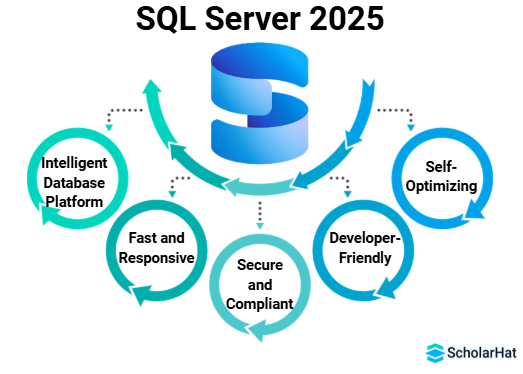
- It is an intelligent database platform that uses AI to optimize queries.
- It is fast and responsive thanks to real-time analytics and event streaming.
- It is secure and compliant with Microsoft Entra authentication and TLS 1.3.
- It is developer-friendly with REST API support, regex, and fuzzy matching.
- It is self-optimizing and efficient using AI-driven tuning and predictive monitoring.
TOP 12 NEW FEATURES IN SQL SERVER 2025
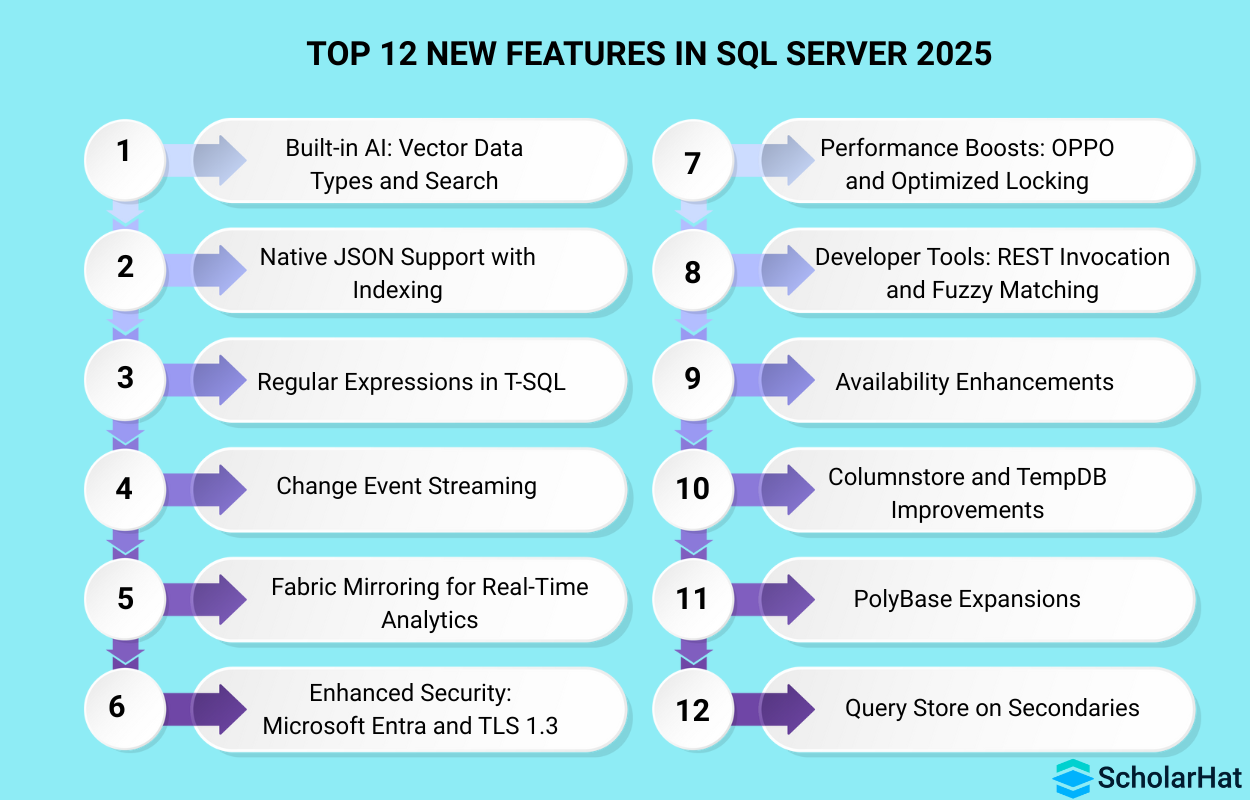
1. Built-in AI: Vector Data Types and Search
SQL Server 2025 introduces native vector storage and similarity search for AI workloads. This allows databases to directly store, search, and compare embeddings used in AI applications.
Key Features:
- Native vector datatype for AI embedding storage
- Similarity search using cosine and distance algorithms
- Faster semantic query execution within database engine
- Supports recommendation and AI-powered search systems
- Eliminates need for external vector databases
Example:
SELECT * FROM products
ORDER BY VECTOR_DISTANCE(embedding, @query_vector)
2. Native JSON Support with Indexing
SQL Server now treats JSON as a first-class citizen with indexing and efficient querying. JSON data can be stored, filtered, and indexed for high-performance access.
Key Features:
- Faster querying of stored JSON documents
- Index support on JSON object properties
- Simplified ingestion of semi-structured application data
- Improved performance for API-driven database workloads
- Easier schema evolution without table redesign
Example:
CREATE INDEX idx_json ON users(data.jsonValue('$.email'))
3. Regular Expressions in T-SQL
Regex support introduces pattern-based searching and validation within SQL queries. Complex string handling becomes easier without external scripts.
Key Features:
- Pattern-based search using SQL regular expressions
- Built-in regex validation within SQL statements
- Simplifies advanced text filtering operations
- Improves cleansing of large textual datasets
- Eliminates dependency on application-level regex
Example:
SELECT * FROM users
WHERE email REGEXP '^[a-z0-9]+@gmail.com$'| Read More: SQL Cheat Sheet: Full Guide for Beginners & Professionals |
4. Change Event Streaming
Real-time data changes are streamed automatically to services like Azure Event Hub and Kafka. Enables immediate analytics and data syncing.
Key Features:
- Streams insert, update, and delete activity instantly
- Enables real-time analytics pipelines and dashboards
- Integrates with Kafka, Azure, and streaming tools
- Improves consistency between transactional and analytical systems
- Reduces lag in business intelligence reporting
Example:
CREATE EVENT STREAM orders_stream TO 'AzureEventHub'
5. Fabric Mirroring for Real-Time Analytics
Fabric Mirroring syncs transactional databases into Microsoft Fabric instantly. Enables real-time lakehouse and warehouse analytics.
Key Features:
- Continuous syncing between SQL and Fabric analytics
- Eliminates traditional ETL delays and pipelines
- Enables near real-time business intelligence dashboards
- Maintains consistency without performance impact on source
- Simplifies hybrid analytics architecture significantly
Example:
ENABLE FABRIC_MIRRORING ON DATABASE salesdb
6. Enhanced Security: Microsoft Entra and TLS 1.3
SQL Server 2025 integrates directly with Microsoft Entra for centralized identity and access management. TLS 1.3 ensures faster, stronger, and more secure encrypted communication between applications and databases.
Key Features:
- Centralized identity enforcement through Microsoft Entra authentication
- Mandatory secure encrypted connections using TLS 1.3
- Improved access control for applications
- Reduced handshake time and connection attacks
- Compliance with enterprise-grade security regulations
Example:
CREATE LOGIN FROM EXTERNAL PROVIDER
7. Performance Boosts: OPPO and Optimized Locking
OPPO reduces query compilation time by optimizing how execution plans are generated. Improved locking mechanisms reduce deadlocks and improve concurrency in high-transaction environments.
Key Features:
- Faster query compilation and execution planning
- Reduced query optimization overhead significantly
- Improved concurrency for high transaction systems
- Intelligent lock escalation avoidance mechanisms
- Faster response under heavy database workloads
8. Developer Tools: REST Invocation and Fuzzy Matching
Developers can now directly call REST APIs from SQL queries without external programs. Fuzzy matching helps identify similar text values, improving data quality and duplicate detection.
Key Features:
- REST API calls directly from SQL agent
- Enables automation with external cloud services
- Built-in fuzzy logic for approximate text matching
- Simplifies third-party API integration workflows
- Improves data cleansing and deduplication
Example:
SELECT * FROM REST_CALL('https://api.service.com/data')
9. Availability Enhancements
High availability is improved through better failover handling and smarter recovery mechanisms. SQL Server 2025 reduces downtime and improves reliability in clustered deployments.
Key Features:
- Intelligent failover based on workload behavior
- Reduced planned and unplanned downtime
- Faster recovery during node failures
- Improved Always-On cluster performance
- Zero-touch maintenance upgrades supported
10. Columnstore and TempDB Improvements
Columnstore indexes are faster and more memory-efficient for analytics workloads. TempDB performance is enhanced, reducing bottlenecks in large transactional systems.
Key Features:
- Faster compression and decompression algorithms
- Improved read speed for analytical workloads
- Reduced TempDB contention under load
- Better memory utilization for columnstore operations
- Improved divide-and-conquer batch execution
11. PolyBase Expansions
PolyBase now supports more data sources, including cloud and external systems. This makes it easier to run queries on external data without importing it into SQL Server.
Key Features:
Queries data without importing into database
Expands integration with cloud storage platforms
Unified querying across multiple data systems
Reduces storage duplication across environments
Enables multi-source data analytics easily
Example:
SELECT * FROM OPENROWSET(BULK 's3://bucket/file.csv')
12. Query Store on Secondaries
Query Store now collects performance data on read-only replicas. This helps administrators analyze slow queries and optimize reporting workloads.
Key Features:
- Monitors query performance on secondary replicas
- Detects regressions in standby systems
- Improves read-only workload optimization
- Enables query tuning on replicated nodes
- Enhances stability of reporting servers
SQL Server 2022 vs SQL Server 2025
Microsoft SQL Server 2025 is a major evolution over SQL Server 2022, focusing on AI integration, automation, real-time analytics, and cloud-first design. While SQL Server 2022 introduced hybrid cloud support, SQL Server 2025 expands this with built-in intelligence, better developer experience, and real-time data streaming.
| Feature | SQL Server 2022 | SQL Server 2025 |
| AI & Automation | Depends on external AI tools for machine learning and automation tasks. | Built-in AI features automate queries, indexing and performance tuning. |
| Data Handling | Supports JSON through functions but indexing is limited and manual. | Provides native JSON support with indexing and improved performance. |
| Query Intelligence | Queries use traditional cost-based optimization techniques. | Uses AI models to auto-optimize and predict better execution plans. |
| Real-Time Analytics | Requires Azure Synapse Link for large-scale analytics processing. | Microsoft Fabric Mirroring provides real-time analytics integration. |
| Security Model | Uses SQL authentication and TLS 1.2 for encrypted connections. | Integrates Microsoft Entra authentication with TLS 1.3 security standard. |
| Developer Capability | T-SQL based development without REST or fuzzy operations. | Supports REST API calls, fuzzy search, and regex in SQL. |
| Performance & Scaling | Manual tuning needed for heavy workloads and scaling issues. | Manual tuning needed for heavy workloads and scaling issues. |
AI Integrated into the SQL Server 2025 Database Engine
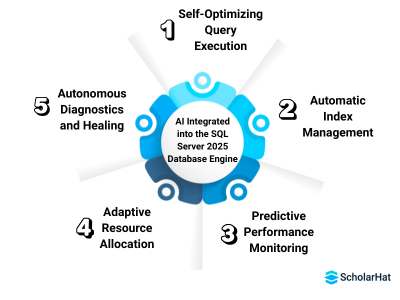
- Self-Optimizing Query Execution: The database automatically improves execution plans using machine learning based on workload patterns.
- Automatic Index Management: Indexes are created, tuned, or removed intelligently without requiring constant DBA involvement.
- Predictive Performance Monitoring: AI identifies slowdowns and risks before they affect production systems.
- Adaptive Resource Allocation: CPU, memory, and I/O usage are balanced dynamically based on real-time demand.
- Autonomous Diagnostics and Healing: Errors and performance issues are detected and corrected automatically.
How to Upgrade to SQL Server 2025?
Step 1: Check Compatibility
Confirm that your operating system, hardware, and current SQL Server version support SQL Server 2025. Use Microsoft Data Migration Assistant to identify upgrade issues early.
Step 2: Take Full Backup
Backup all system and user databases, logins, and server settings before starting the upgrade. This ensures you can recover quickly if any problem occurs.
Step 3: Fix Reported Issues
Review the compatibility report and resolve deprecated features or breaking changes. This reduces the risk of application failure after upgrade.
Step 4: Install SQL Server 2025
Choose either in-place upgrade or side-by-side installation based on downtime tolerance and safety needs. Complete setup by selecting authentication and required features.
Step 5: Upgrade Compatibility Level
Set database compatibility to SQL Server 2025 to enable new optimizations and features. Restart services if required.
Step 6: Test and Monitor
Verify application connectivity, run integrity checks, and monitor performance after upgrade. Watch server logs closely for errors or slow queries.
Conclusion
SQL Server 2025 is an intelligent, AI-powered database platform that improves performance, security, and developer productivity. Its real-time analytics and advanced features help organizations manage data efficiently and build modern applications.
Full-Stack .NET Developers earn up to ₹35 LPA in India’s tech boom. Kickstart your high-paying career with our Full Stack .NET Developer Course today!
FAQs
SQL Server 2025 is Microsoft’s latest intelligent database platform with AI, real-time analytics, and advanced security features.
Older versions focused on storage and queries, while SQL Server 2025 adds intelligence, automation, and AI-based performance tuning.
Yes, it integrates Microsoft Entra authentication and uses TLS 1.3 for strong encryption and improved access control.
It is suitable for business systems, web applications, AI platforms, real-time dashboards, enterprise software, and cloud-based solutions.
Knowledge of SQL, basics of cloud platforms, and an understanding of AI concepts are helpful.
Take our Sqlserver skill challenge to evaluate yourself!

In less than 5 minutes, with our skill challenge, you can identify your knowledge gaps and strengths in a given skill.
