



Live Batches
Book Session
Menu
Curriculum
Account
Login / Sign Up
Live instructor-led

Azure DevOps Certification Training

Master Azure DevOps with our comprehensive certification training. Live instructor-led sessions, hands-on labs, and real projects. 26% OFF. Enroll now and boost your DevOps career!

Talk to a counsellor Watch preview

12
live sessions
6
modules
98
lessons
45
self-paced videos
Shailendra Chauhan
Your mentor Shailendra Chauhan Microsoft MVP, Founder & CEO at ScholarHat
12 live sessionsinstructor-led 6-module programstructured path Certificateon completion

Azure DevOps Tools and Technologies Covered

Azure Boards
Azure Boards
Git
Git
Azure Repos
Azure Repos
Azure Pipelines
Azure Pipelines
Test Plans
Test Plans
Artifacts
Artifacts
Azure VM
Azure VM
Web App
Web App
Azure SQL
Azure SQL
VS Code IDE
VS Code IDE
GitHub
GitHub
Terraform
Terraform

Azure DevOps Course Key Features

6 Weeks of Intensive Live Training

Interactive sessions with real-time problem solving

Learn from Microsoft MVPs

Training by globally recognized experts

Build Food Delivery Website

Hands-on project for your portfolio

Hands-On Labs

Practice real scenarios with guided, interactive labs

Interview Q&A

Frequently asked interview questions with clear answers

Quick Notes

Concise revision notes for fast and effective learning

Why Learn Azure DevOps?

  1. Boost Developer Productivity - Adopted by top tech teams, Azure DevOps helps increase developer efficiency by 15–20% through automation and streamlined processes.
  2. Enhance Team Collaboration - Break down silos with real-time visibility across development stages—ensuring seamless coordination between dev, QA, and ops teams.
  3. Accelerate Software Delivery - Companies using Azure DevOps report up to 208x faster deployments, enabling rapid release cycles and quicker time-to-market
  4. Reduce Manual Workloads - Save time and minimize errors with automated pipelines, reducing manual effort by up to 25%.
  5. In-Demand Skill for Modern Dev Teams - Azure DevOps is a core tool in cloud-native and enterprise environments, making it a valuable skill for career growth in DevOps and software engineering.

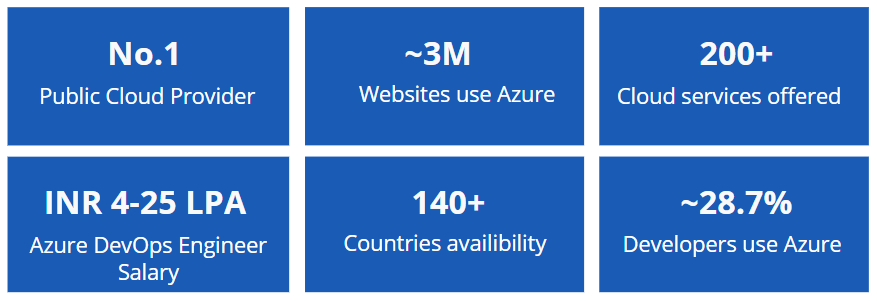
No.1

Public Cloud Provider

~3M

Websites use Azure

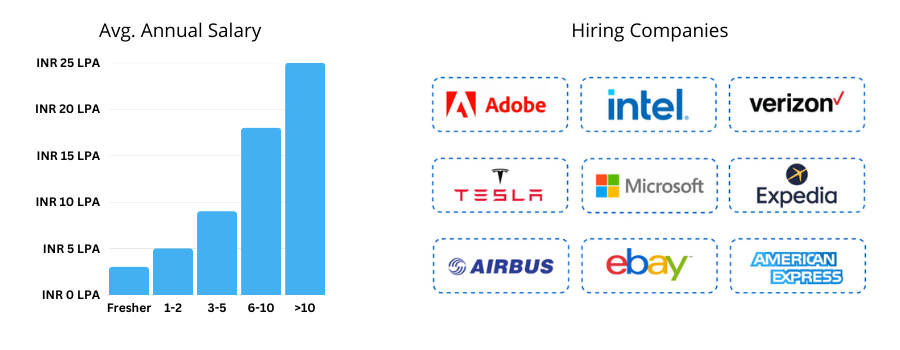
INR 4-25 LPA

Azure DevOps Engineer Salary

140+

Countries availability

~28.7%

Developers use Azure

Azure DevOps Career Scope

Azure DevOps Engineer
DevOps Engineer
Build and Release Engineer
Cloud DevOps Architect
Cloud Transformation Lead
₹7 LPA
Avg package
35%
Avg hike
3,200+
Transitions
80%
Demand
Annual Salaries (₹)
₹10 LPA
Avg package
40%
Avg hike
3,200+
Transitions
78%
Demand
Annual Salaries (₹)
₹9 LPA
Avg package
38%
Avg hike
3,200+
Transitions
75%
Demand
Annual Salaries (₹)
₹21 LPA
Avg package
45%
Avg hike
3,200+
Transitions
70%
Demand
Annual Salaries (₹)
₹42 LPA
Avg package
80%
Avg hike
6,000+
Transitions
99%
Demand
Annual Salaries (₹)

Course Curriculum

  • 6 modules
  • 98 lessons
  • 12 live sessions
  1. Module 1 Azure DevOps 18 lessons
    • Understanding DevOps
    • DevOps Ecosystem
    • DevOps Advantages
    • DevOps Market Trends
    • DevOps Engineer Skills
    • DevOps Delivery Pipeline
    • What is Azure DevOps
    • VSTS vs. Azure DevOps
    • Core Concepts
    • Azure DevOps vs. TFS
    • Pricing Tiers
    • Creating Azure DevOps organization
    • Creating and configuring a new team project
    • Manage and Configuring teams in VSTS
    • Cloning a Git repository into your team project
    • Services available in Azure DevOps
    • Marketplace
    • Connect to a Project from Web Portal and Visual Studio

  2. Module 2 Agile and Azure Boards 12 lessons
    • Overview of Agile planning tools
    • Create a Project Backlog
    • PowerPoint storyboarding
    • Sprint Planning
    • Identifying user stores for the next sprint
    • Capacity planning
    • Defining tasks to complete a user story
    • Adjust work to fit team capacity
    • Sharing a sprint with stakeholders
    • Managing work using teams
    • Tracking progress using Kanban and task boards
    • Querying Items
  3. Module 3 Azure Repos 14 lessons
    • Introduction to Git
    • Git Workflow
    • Git Concepts - Repository, Fork, Branch, Clone, Commit, Pull Requests
    • Using Git and Git Tools
    • Creating a local repository
    • Cloning a remote repository
    • Staging files
    • Committing files
    • Adding branches to your workflow
    • Merge vs. Rebase
    • Synchronizing with a remote repository
    • Pull Requests
    • Working with Visual Studio and command line tools
    • Create Repository and host it in Azure Repos
  4. Module 4 Azure Pipelines 20 lessons
    • Introduction to Pipelines
    • Core Concepts - Agents, Artifacts, Deployment Target, Pipeline, Build, Release
    • Create your first Pipeline using Visual Designer
    • Using YAML for configuring Pipelines
    • Build and Deploy .NET Core App
    • Customizing your build using tasks
    • A closer look at build attributes
    • Triggering builds
    • The importance of maintaining code quality
    • Unit testing
    • Code coverage
    • Code Clone Analysis
    • Overview of release management
    • Understanding artifacts
    • Creating a release definition
    • Understanding environments
    • Approval workflows and notifications
    • Configuring Continuous Deployment (CD)
    • Multi-machine deployment using deployment groups
    • Managing secrets in the Azure Key Vault
  5. Module 5 Terraform 15 lessons
    • What is Terraform?
    • How does Terraform work?
    • Terraform Lifecycle
    • Providers
    • Resources
    • State
    • Types in Terraform
    • Loops
    • What are Modules?
    • Benefits of Using Modules
    • Creating and Using Modules
    • Preparing the Azure Environment
    • Writing Azure Specific Configurations
    • Managing Azure Resources with Terraform
    • Best Practices for Terraform with Azure
  6. Module 6 Test Plans and Artifacts 19 lessons
    • Configuring infrastructure for test execution
    • Executing UI tests (Coded UI and Selenium tests)
    • Executing load and performance tests using Azure
    • Types of tests
    • See if your code scales with Web performance and Load Testing
    • Load testing with the Cloud
    • Test planning with Microsoft Test Manager
    • Test Plan, test suite, test case
    • Running manual tests using the Test Runner
    • Parameters and Shared Steps
    • Action recording
    • Creating bug work items
    • Minimize retesting using impact analysis
    • Introduction
    • Create and host packages
    • Using shared packages
    • Protect your packages
    • Introduction
    • Using Azure DevOps Extensions
  • 3 modules
  • 45 videos
  • 2h 52m total
  1. Module 1Agile Planning & Project Management with Azure Boards 12 videos 1h 12m

    Organization & Azure Boards

    • DevOps Organization 12m 30s
    • Azure Boards 00m 43s

    Process & Practices

    • CMMI vs. Agile vs. Scrum 0h 02m 24s
    • Azure Boards 12m 16s
    • DevOps vs. Agile 03m 40s
    • Agile - How Does Scrum Work 03m 15s
    • Processes Agile, Scrum and CMMI 0h 06m 40s
    • Basic vs. Agile vs. Scrum vs. CMMI 01m 45s

    Tasks & Sprint Planning

    • Creating Tasks and Stories 22m 32s
    • Kanban Board 01m 34s
    • Dive into Kanban Board 02m 50s
    • Burndown Graph and Velocity 01m 57s
  2. Module 2DevOps and Azure DevOps 17 videos 35m

    Understanding Devops

    • What is DevOps? 01m 47s
    • DevOps : Culture, Practices & Tools 02m 43s
    • Need of DevOps 02m 03s

    DevOps Working and Benefits

    • DevOps Lifecycle 02m 30s
    • How DevOps Works? 02m 52s
    • DevOps Advantages 02m 36s
    • DevOps Tools 02m 09s

    CI/CD

    • Continuous Integration 01m 33s
    • Continuous Delivery (CD) 01m 01s
    • Continuous Delivery & Continuous Deployment 01m 38s

    Azure DevOps

    • Introduction to Azure DevOps 01m 58s
    • Azure DevOps Offerings 02m 33s
    • DevOps with Azure DevOps 02m 03s

    Tools and Platforms Support

    • Azure DevOps and Third Party Tools 01m 46s
    • Azure DevOps Platform Supports 00m 51s

    Azure DevOps Services & Server

    • Azure DevOps Services vs. Azure DevOps Server 01m 56s
    • Azure DevOps Pricing 03m 05s
  3. Module 3Building CI/CD pipeline using Azure DevOps and Web App 16 videos 1h 4m

    Course Overview

    • Course Overview 02m 43s

    Azure Pipeline

    • Introduction to Azure Pipeline 01m 30s
    • Azure Pipeline Structure 02m 38s
    • Azure Pipelines Platform Support 01m 20s

    Understanding CI/CD

    • Continuous Integration 02m 28s
    • Continuous Delivery (CD) 01m 49s
    • Continuous Delivery & Continuous Deployment 01m 43s

    Azure Build Pipeline

    • Types of Builds 02m 19s
    • DEMO: Creating Azure Web App 04m 15s
    • DEMO: Creating and Configuring DevOps Project 06m 46s
    • DEMO:Creating ASP.NET Core Project 05m 57s
    • DEMO: Azure Build Pipeline with Azure Web App 09m 16s

    Azure Release Pipeline

    • Azure Release Pipeline 02m 30s
    • DEMO: Azure Release Pipeline For Staging Environment 07m 01s
    • DEMO: Azure Release Pipeline For Production Environment 06m 56s
    • DEMO: The Complete CI/CD Workflow 05m 44s
  1. 01 Building CI/CD pipeline using Azure DevOps and Web App 00:03:00
  2. 02 Introduction to Azure DevOps, DevOps Organization and Azure Boards 0:03:00
  3. 03 Azure DevOps Process Templates 0:02:45
  4. 04 Tasks & Sprint Planning 0:02:00
  5. 05 Understanding DevOps 0:01:35
  6. 06 DevOps Working & Benefits 0:01:50
  7. 07 Introduction to DevOps 0:12:00
  8. 08 Design and implement branch strategies and workflows 0:10:00
  9. 09 Explore Azure Pipelines 0:06:30
  10. 10 Create a release pipeline 0:08:00
  11. 11 Introduction to deployment patterns 0:05:00
  12. 12 Explore infrastructure as code and configuration management 0:05:00
  13. 13 Explore package dependencies 0:05:00
  14. 14 Implement tools to track usage and flow 0:14:00
  15. 15 Introduction to Secure DevOps 0:08:00
  16. 16 Introduction to GitHub Actions 0:06:00
  17. 17 Learn continuous integration with GitHub Actions 0:07:00
  18. 18 Implement Open-Source Software 0:08:00
  19. 19 Develop monitor and status dashboards 0:09:00
  20. 20 Understand package management 0:06:00
  21. 21 Create Azure resources using Azure Resource Manager templates 0:06:00
  22. 22 Implement blue-green deployment and feature toggles 5:30:00
  23. 23 Explore release recommendations 0:07:00
  24. 24 Manage Azure Pipeline agents and pools 0:08:00
  25. 25 Describe pipelines and concurrency 0:07:00
  26. 26 Collaborate with pull requests in Azure Repos 0:04:00
  27. 27 Explore Git hooks 0:06:00
  28. 28 Plan Agile with GitHub Projects and Azure Boards 0:11:00
  29. 29 Provision and test environments 0:07:00
  30. 30 Implement canary releases and dark launching 0:04:00
  31. 31 Create Azure resources by using Azure CLI 0:04:00
  32. 32 Migrate consolidate and secure artifacts 0:06:00
  33. 33 Share knowledge within teams 0:05:00
  34. 34 Software Composition Analysis 0:09:00
  35. 35 Design a container build strategy 0:07:00
  36. 36 Identify Technical Debt 0:08:00
  37. 37 Security Monitoring and Governance 0:09:00
  38. 38 Design processes to automate application analytics 0:05:00
  39. 39 Implement a versioning strategy 0:03:00
  40. 40 Explore Azure Automation with DevOps 0:11:00
  41. 41 Implement A/B testing and progressive exposure deployment 0:02:00
  42. 42 Manage and modularize tasks and templates 0:03:00
  43. 43 Plan foster inner source 0:06:00
  44. 44 Design and implement a pipeline strategy 0:08:00
  45. 45 Integrate with Azure Pipelines 0:08:00
  46. 46 Manage and configure repositories 0:14:00
  47. 47 Automate inspection of health 0:11:00
  48. 48 Integrate with identity management systems 0:08:00
  49. 49 Implement Desired State Configuration (DSC) 0:05:00
  50. 50 Introduction to GitHub Packages 0:05:00
  51. 51 Manage alerts, blameless retrospectives and a just culture 0:07:00
  52. 52 Implement Bicep 0:03:00
  53. 53 Manage application configuration data 0:10:00
  1. 01 Creating and Configuring GitHub Organizations 01:15:00
  2. 02 Create a Build Pipeline 00:30:00
  3. 03 Build CI/CD Pipeline for Azure Web Apps 01:00:00
  4. 04 Manage GitHub Repository Using GitHub 00:40:00
  5. 05 Manage Git Branches 00:45:00
  6. 06 Setup Git in Angular Project, Commit and Deploy to GitHub Pages 00:45:00
  7. 07 Build CI/CD Pipeline for Azure Virtual Machine 00:30:00
  8. 08 Configuring Pipelines as Code with YAML 00:30:00
  9. 09 Setup Git in React Project, Commit and Deploy to GitHub Pages 00:45:00
  10. 10 Build Pipeline for Angular using YAML 00:30:00
  11. 11 Build Pipeline for React using YAML 00:30:00
  12. 12 Setup Project in Azure DevOps Using Agile Process 00:45:00
  13. 13 Configuring Azure Repo 00:30:00
  14. 14 Setup and Configure Self-Hosted Agent for Azure DevOps Build/Release 00:45:00
  15. 15 Working with Git in Azure Repos 00:45:00
  16. 16 Build Your First CI Pipeline in Azure DevOps with GitHub and YAML 01:00:00

Project #1: Deploying eShopFlix Using Azure DevOps CI/CD

Step-by-Step Guide Deploying the eShopFlix project using Azure DevOps CI/CD pipelines ensures an automated and efficient deployment process. Azure DevOps integrates seamlessly with Azure services, enabling smooth code integration, testing, and deployment. Below is a detailed description of deploying this project to Azure.

Implementation Details

  1. Azure Account: Active Azure subscription to deploy resources.
  2. Azure DevOps Account: For repository, pipelines, and artifact management.
  3. Azure Resources: App Service: For hosting the .NET Core web application, SQL Database: To store eShopFlix data, Azure Storage: For static assets like images, Azure Key Vault: To securely manage secrets such as connection strings.
  4. Code Repository: Source code hosted on Azure Repos, GitHub, or any other Git-based repository.
  5. Build Pipeline (CI - Continuous Integration)
  6. Release Pipeline (CD - Continuous Deployment)
  7. Enable CI/CD Triggers
  8. Monitoring and Logging

Project #2: Deploying OTT Platform Using Azure DevOps CI/CD

Step-by-Step Guide Deploying the OTT platform project using Azure DevOps CI/CD pipelines ensures an automated and efficient deployment process. Azure DevOps integrates seamlessly with Azure services, enabling smooth code integration, testing, and deployment. Below is a detailed description of deploying this project to Azure.

Implementation Details

  1. Azure Account: Active Azure subscription to deploy resources.
  2. Azure DevOps Account: For repository, pipelines, and artifact management.
  3. Azure Resources: App Service: For hosting the React web application, SQL Database: To store data, Azure Storage: For static assets like images, Azure Key Vault: To securely manage secrets such as connection strings.
  4. Code Repository: Source code hosted on Azure Repos, GitHub, or any other Git-based repository.
  5. Build Pipeline (CI - Continuous Integration)
  6. Release Pipeline (CD - Continuous Deployment)
  7. Enable CI/CD Triggers
  8. Monitoring and Logging
  1. 01 Agile Planning and Project Management with Azure Boards 20 questions
  2. 02 Introduction to DevOps and Azure DevOps 20 questions
  3. 03 Building CI CD pipeline using Azure DevOps and Web App 15 questions
  4. 04 Implement CI with Azure Pipelines and GitHub Actions 15 questions
  5. 05 Design and Implement a Release Strategy 15 questions
  6. 06 Implement a Secure Continuous Deployment using Azure Pipelines 15 questions
  7. 07 Manage Infrastructure as Code using Azure and DSC 15 questions
  8. 08 Design and Implement a Dependency Management Strategy 15 questions
  9. 09 Implement Continuous Feedback 15 questions
  10. 10 Implement Security and Validate Code Bases for Compliance 15 questions
  11. 11 Development for Enterprise DevOps 15 questions
  1. Q&A guideAgile Planning & Project Management with Azure Boards 1 questions
    • Implement Tools to Track Usage and Flow 2:00:00
  2. Q&A guideAZ-400: Git and Repository Management in Azure DevOps 2 questions
    • Manage and Configure Repositories 2:00:00
    • Design and Implement Branch Strategies and Workflows 2:00:00
  3. Q&A guideAZ-400: Implement CI with Azure Pipelines 4 questions
    • Learn Continuous Integration with GitHub Actions 2:00:00
    • Integrate with Azure Pipelines 2:00:00
    • Design and Implement a Pipeline Strategy 2:00:00
    • Jenkins with Azure DevOps 2:00:00
  4. Q&A guideAZ-400: Design and implement a release strategy 5 questions
    • Implement A/B Testing and Progressive Exposure Deployment 2:00:00
    • Implement Canary Releases and Dark Launching 2:00:00
    • Implement Blue-Green Deployment and Feature Toggles 2:00:00
    • Introduction to Deployment Patterns 2:00:00
    • Create a Release Pipeline 2:00:00
  5. Q&A guideAZ-400: Secure Continuous Deployment with Azure Pipelines 1 questions
    • Manage Application Configuration Data 2:00:00
  6. Q&A guideAZ-400: Manage infrastructure as code using Azure and DSC 7 questions
    • Implement Bicep 2:00:00
    • Implement Desired State Configuration (DSC) 2:00:00
    • Implement Infrastructure as Code (IaC) and Configuration Management 2:00:00
    • Implement Terraform for Infrastructure as Code 2:00:00
    • Explore Azure Automation with DevOps 2:00:00
    • Create Azure Resources Using Azure CLI 2:00:00
    • Create Azure Resources Using Azure Resource Manager (ARM) Templates 2:00:00
  7. Q&A guideAZ-400: Design and implement a dependency management strategy 3 questions
    • Introduction to GitHub Packages 2:00:00
    • Implement a Versioning Strategy 2:00:00
    • Migrate, Consolidate, and Secure Artifacts 2:00:00
  8. Q&A guideAZ-400: Implement continuous feedback 2 questions
    • Manage Alerts, Blameless Retrospectives, and a Just Culture 2:00:00
    • Develop Monitor and Status Dashboards 2:00:00
  9. Q&A guideAZ-400: Implement security and validate code bases for compliance 1 questions
    • Introduction to Secure DevOps 2:00:00

Azure DevOps Course Eligibility

Pre-requisites

Professionals interested in DevOps online training should have prior experience creating web applications using JavaScript or .NET frameworks, such as Node.js, Angular, or React, as well as Microsoft Azure knowledge.

Who can Join?

The online DevOps training course equips students with the skills necessary to become DevOps Engineers, who are in charge of the operational duties that come after code release, monitoring, scaling, and deployment. The Azure DevOps learning path provides a summary of DevOps and its key components.

OUR ALUMNI WORK AT

Trusted by learners whose careers now thrive at leading companies

Choose Training Options

17% OFF
Live Training

Live, expert-led classes mapped to your certification.

₹20,288 ₹16,759
12 months access to the course
What you get
Live Sessions 12
Projects 2
Skill Tests 11
For Business
Corporate Training

Tailored team training for your organization.

Let's talk
Minimum 5 users
Includes
Live Sessions
Custom Content
Flexible Schedule
Labs & Tests
Real Projects
24x7 LMS Access
Trusted by 2,00,000+ Thought Developers, Tech Leads and Architects

Azure DevOps Career & Certification

The Azure DevOps training covers DevOps principles, Continuous Integration (CI), Azure Repos, Azure Pipelines, Sprint Planning and Tracking, and many more topics.

IT professionals who want to advance their career by upskilling in cloud computing and DevOps technologies should go for Azure DevOps certification.

You will gain a deep understanding of Azure Boards, Azure Repos, Azure Pipelines, Azure Test Plans, version control with Git, and other core Azure DevOps skills.

Professionals interested in DevOps training should have prior experience in web application development using JavaScript or .NET, frameworks like Node.js, Angular, or React, and basic Microsoft Azure knowledge.

The Azure DevOps Certification exam typically includes 40-60 MCQs with single or multiple correct answers, hands-on labs, and case studies, with a duration of 2 hours 30 minutes. Passing marks are around 700 out of 1000.

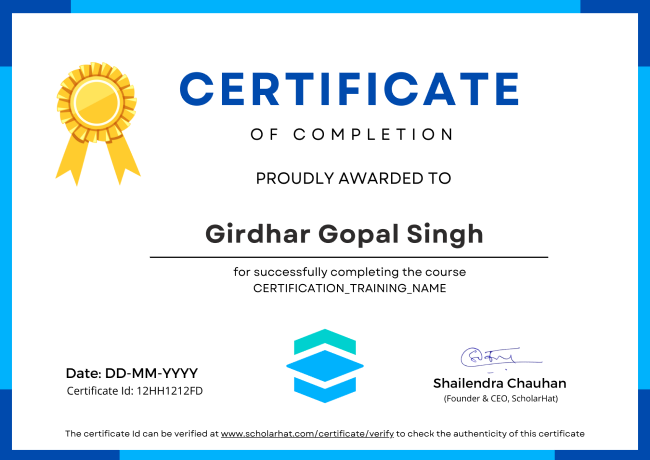
Verifiable Credential Azure DevOps Career & Certification certificate

Course Mentors

Shailendra Chauhan
11X MICROSOFT MVP AI ARCHITECT

Shailendra Chauhan

Microsoft MVP, Founder & CEO at ScholarHat

17+ Years of Industry Experience as Mentor & Solution Architect
Expert in .NET, Angular, React & Python
Azure Cloud & AI/ML/Gen AI Specialist

Frequently Asked Questions

Q1. Which Azure DevOps certification is right for me?
The answer to these questions depends on your current role, experience level, career goals, and areas of interest within the Azure ecosystem.
Q2. Is Azure DevOps a good career move?
Yes, it is a good career move due to high demand, a wide range of opportunities, continuous evolution and adaptation, etc.
Q3. Are there any prerequisites for taking an Azure DevOps course?
Professionals interested in DevOps online training should have prior experience creating web applications using JavaScript or .NET frameworks, such as Node.js, Angular, or React, as well as Microsoft Azure knowledge.
Q4. What is the cost of an Azure DevOps course?
The course is quite affordable. It even gives you the flexibility for opting for the only Live Sessions Course at Rs. 12,389 and live sessions along with video courses, and hands-on labs at Rs. 14036.
Q5. Can I learn DevOps in 2 months?
Learning DevOps in two months is feasible, but it depends on various factors such as your prior experience, dedication, learning resources, and the depth of knowledge you want to acquire.
Q6. How long is the Azure DevOps Course?
The Azure DevOps Course consists of six weeks of Live Intensive Training where you will be taught from the fundamentals of Azure DevOps to the advanced topics like Azure Pipelines and Azure Boards.
Q7. What are the different types of Azure DevOps certifications?
They Azure DevOps Certifications are basically categorized into four categories: Fundamentals Associate Expert Speciality All certifications are role-based like Azure Administrator, Azure Solution Architect, Azure Developer, and Azure AI Engineer.
Q8. Who should take an Azure DevOps Training Course?
An Azure DevOps Training Course is designed for a wide range of professionals involved in software development, deployment, and operations.
Q9. Who should take an Azure DevOps Training Course?
An Azure DevOps Training Course is designed for a wide range of professionals involved in software development, deployment, and operations.
Q10. What are the main benefits of a DevOps certification?
The certification has the benefits such as an increase in employment opportunities, better knowledge, and skills, paid higher, better productivity, better effectiveness, securing modern applications to benefit the organization, and reduction of risk by software reliability and integrity.
A lot of independent training companies also give Azure DevOps online training courses. These providers frequently give more specialized training alternatives, such as boot camps or intense courses that concentrate on particular Azure DevOps topics. It's crucial to check that the course materials use the most recent Azure DevOps capabilities and best practices when selecting a training provider. To help you prepare for the certification examinations, you might also want to look for a provider that gives hands-on experience with the Azure DevOps platform. In general, earning an Azure DevOps certification might be a wise career move, especially if you work in IT or software development. If you receive the proper instruction and preparation, you can showcase your knowledge on this well-known platform
Q11. What tasks does a DevOps engineer perform?
The duties and responsibilities of an Azure DevOps Engineer involve planning and implementing solutions for teamwork, programming, networking, configuration management, security, compliance, continuous deployment, validation, distribution, tracking, and reporting.
Q1. What is the Azure AI Cloud Sandbox?
The Azure AI Cloud Sandbox is a secure, isolated environment that lets you practice and experiment with Azure AI services without affecting production resources. It provides hands-on access to real Azure AI capabilities in a risk-free setup.
Q2. Can I Attend a Demo Session before Enrolment?
Yes, you can Attend a Demo Session before Enrolment in angular certification course. It gives you the opportunity to assess whether the training program aligns with your learning objectives. So, don't hesitate! Take advantage of this opportunity and attend a demo session before making your decision.
Q3. Can I request for a support session if I need to better understand the topics?
Yes, of course you can request for a support session if you need to better understand the topics. For that, you need to be in touch with the counsellor. Contact on +91- 999 9123 502 or you can mail us at hello@scholarhat.com
Q4. Who are your mentors?
All our mentors are highly qualified and experience professionals. All have at least 8-10 yrs of development experience in various technologies and are trained by ScholarHat to deliver interactive training to the participants.
Q5. What If I miss my online training class?
All online training classes are recorded. You will get the recorded sessions so that you can watch the online classes when you want. Also, you can join other class to do your missing classes.
Q6. Can I share my course with someone else?
In short, no. Check our licensing that you agree to by using ScholarHat LMS. We track this stuff, any abuse of copyright is taken seriously. Thanks for your understanding on this one.
Q7. Do you provide any course material or live session videos?
Yes we do. You will get access to the entire content including class videos, mockups, and assignments through LMS.
Q8. Do you provide training on latest technology version?
Yes we do. As the technology upgrades we do update our content and provide your training on latest version of that technology.
Q9. Do you prepare me for the job interview?
Yes, we do. We will discuss all possible technical interview questions and answers during the training program so that you can prepare yourself for interview.
Q10. Will I get placement assistance after receiving my course completion certificate?
Yes, you’ll get placement assistance after receiving your course completion certificate. The placement assistance provided by the US will guide you through the job search process, help you polish your resume, and connect you with potential employers. For that, you need to be in touch with the counsellor. Contact on +91- 999 9123 502 or you can mail us at hello@scholarhat.com
Still have some questions? Let's discuss.
CONTACT US